Intro
Design
Airframe
Hardware
Software
Testing
Launch 5
Glossary
Links
Contact
Software
| Goals
Most of those who have worked professionally making software have lived through the nightmare of shipping product which contains code you don't have any faith in. Usually more than once, and often, having helped write the code in question yourself. Often the marketing department drives the product cycle. Or the company simply chases false economies, by asking programmers to ship what amount to mock-ups, or compressing the debugging phase of a project when the schedule slips. Even if things start out well, with a good project plan, agreed to internal standards, and a nicely structured code base, everything falls apart over time in a losing race to meet the moving target of the customer's or market's desires. It always seems that quality and reliability are the least valued objectives in software development, and that can be demoralizing for a software developer. This project was in part an opportunity to see what happened when those pressures and impulsive management decisions were put aside. Would I follow the same path myself? Is it possible to learn good habits and standards and then stick to them? Methods that might lead to shorter development cycles, with code most often working on the first compile. And ending up with something you can not only have faith in, but that can be empirically testable as reliable software in a demanding, complex, real-world system.
Initially I started out with a "white-paper" attitude, looking for the platform with the best reputation for developing reliable, real time systems. Over time I came to realize that there is a tension here between prestige and practical performance. An Ada / Unix based system would seem to be the ideal - the most virtuous. But Ada's structure and design-for-reliability approach is burdened by poor support on "civilian" platforms, and in particular a very large instruction set that, in the view of many experts in the field, hinders its in-practice suitability for reliable systems, no matter what its reputation is. Unix, as well, is not very available for 16-bit embedded systems, and 32-bit systems are too battery-hungry. What I settled on was using an old language, C, in a rigorous way. C++ was put aside almost immediately, as a language extension that just isn't defined, clear or stable enough for a high-reliability system to be worth its benefits. The operating system used is nominally DOS at both ends, as I have no faith in the stability of Windows. As the industrial PC-104 uses a dos-rom operating system, that also provides machine-code level compatibility between the software modules and data structures both in the aircraft and on the ground. This would also put a higher burden on the practices used, instead of reliance on the reputation of a language to provide quality. It turns out that many established high-reliability system developers take this approach, where reliability largely rests on programmer practices and rigorous static-checking. Automatically-verifiable standards have been developed, such as MISRA-C, to ensure reliable, fail-safe end products with the C language. The book Safer C - Developing Software for High-Integrity and Safety-Critical Systems, has also been a great help, as have numerous websites (most of which I've since lost track of), on developing good programming practices. There are strong parallels here with the aviation world. For example, most light Cessnas are decades old, and their technology level is 1960's at best. Yet, they are by the standards of the field, extremely safe and reliable aircraft. This isn't despite the age of their designs - it's because of it. Every issue has been resolved through field experience, with modifications and fixes carefully recorded and distributed. New, up-to-date light aircraft designs often take a decade or two to resolve initially mixed safety records, as they systematically find obscure but critical problems with their designs through painful experience. The aerospace world might have a reputation to some people as being cutting-edge, but in fact even fighter aircraft and space-probes tend to have computers in them that a palm-pilot might put to shame. Why? Because the consumer software market - and the software development community - have a profound and deep preference for novelty over reliability. Software developers in particular, often misunderstand the relationship between a language's intellectual elegance, and its real world effects on reliability. This can nowhere be more clearly seen than in the lunacy of an often heard idea that " if we could just rewrite the code-base from scratch" a piece of software might be less buggy, which is a perfect example of Things You Should Never Do in software development. If the goal is reliable real-time software, you want to stay well back from the bleeding edge.
Using the ideas above has worked out very well. While there have been software / hardware headaches in developing custom onboard drivers for some systems, such as the networking protocol and quickcam, overall the experience has been very good. Throughout, I managed to keep to high standards in both development and testing, and the debugging phase was in most cases dramatically reduced. The majority of the gains came from careful static-checking against pre-set practices, which I cannot recommend enough. But static checking "by hand" really isn't the right way to do things. Ideally, a code standards checking tool should be used, as the "Lint" like features of your compiler probably won't catch most deviations from safe coding standards. Several companies make such software, much of it based around enforcing MISRA or similar regimes. I've tried out PRQA, a "quality assurance tool" from Programming Research, and the improvement over eyeballing your own code is fairly impressive. The potential bugs I missed on my own were downright creepy, and automated checking and structure factoring analysis gives you a much more secure feeling about the end product. Being able to standards-check more often is also an important bonus, saving hours of careful code review. The code base has become larger than I would have initially expected. There are about 12,000 lines of code unique to the ground control and flight simulator, about 9,000 unique to the flight software, and around 4000 lines of code in modules that both pieces of software use. So, a total of around 25,000 lines overall. However, the resulting software is extremely reliable, going hundreds of hours in simulation and field testing without a lockup or serious bug showing up.
The onboard software provides all the hardware-servicing and telemetry functions with a combination of interrupts and a 4hz main loop, in addition to the autopilot and "expert pilot" high-level functions. In each main loop iteration, the system trips the hardware watchdog timer, which will reset the onboard computer at the hardware level if it goes more than 1.6s without such a trip. The cameras are treated as non-essentials, with the quickcam's capture and jpeg compression in particular only getting the leftovers of processor time. Telemetry, both to and from ground, is also treated as secondary to the functions getting accurate instrument and nav data to serve the base level and expert-system level autopilot, and simply flying the aircraft. The glider can be directed at the raw control level in Manual mode, told what heading to fly, what altitude to hit the chute level in Autopilot mode, or left to its own judgment in Expert-system mode. It will trip into Expert mode if it goes without contact with the ground for several minutes. While in Expert mode, the software can intelligently decide when it's best to release from the balloon, whether at the set altitude or as circumstances demand. After release trim it will trim itself out, use the best navigation method back, and plan a proper landing approach to within 100 m. It takes a cautious approach to everything; for example, it has the ability to recognize when it's hopeless to try to get back, and hit the parachute before it hits the ground, or when it might be out of control and needs to take a more aggressive approach to trimming out to level flight. The system can estimate wind speed using ground track, compass, and calculated TAS, and then use that data as part of the landing approach planning. If an instrument fails or provides nonsensical data, it can in most cases recognize and work around the problem. If the glider lands or crashes away from the landing site - perhaps behind terrain so the last telemetry doesn't give an accurate position - it can send an "ELT" signal. The system will shut down one battery to save power for later, and then wake up for a couple of minutes at several set times each day to transmit its position, for about a week.
|
| Ground Software
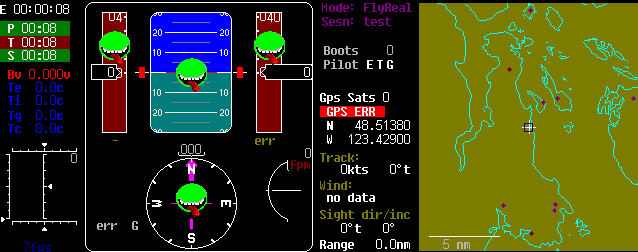
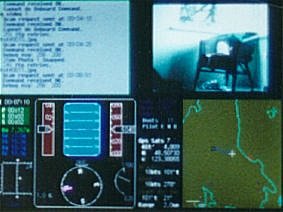
On the right is a photo of the ground display, which shows the command-line text input/output window, quickcam jpeg-window next to it, and flight displays and moving map below. In the screen capture below, you can see the primary part of the ground display, with most of the instrument-failed flags up. There are now also audio 'pings' and fail-alarms that allow the user to comfortably walk away from the ground computer during the potentially long flights (up to 4 hours). The upper-left time displays are for total elapsed time, and time since the last successful ping-pong response, primary, and secondary telemetry packets. On the lower left is the control-position display. The artificial-horizon displays only glideslope relative to the air; although roll-rate data exists and is displayed by tapes on either side of the horizon, there is no true roll position data available. Note the dots on the moving map; these allow quick distance and headings to points best avoided, such as airports, and fast reference to alternate landing sites. So if it looks like the glider won't be able to make it all the way back, it can be told to change its landing site in seconds. |
|
 The
ground system records telemetry, displays the glider's current status
and position, and provides simulated GPS and instrument data to the
glider's onboard systems for testing. Again, it runs in DOS, for
simplicity and reliability. No prestige here, but on the other
hand, it's rock-solid, which you can't say about many (any?) windows-style
environments.
The
ground system records telemetry, displays the glider's current status
and position, and provides simulated GPS and instrument data to the
glider's onboard systems for testing. Again, it runs in DOS, for
simplicity and reliability. No prestige here, but on the other
hand, it's rock-solid, which you can't say about many (any?) windows-style
environments.